
Let's try it!
About the demo
This demo showcases using Vespa for performing combined textual and visual search through a large database of PDF documents. It uses a combination of textual search using the BM25 ranking algorithm along with vector similarity search of image embeddings generated using the ColPali vision model.
For queries where BM25 is the only ranking function, a text ranking based on the text extracted from the PDF pages is done, and the highest scores are returned. When the vision model is involved, the query gets embedded using ColPali, and a vector similarity search using Hierarchical Navigable Small World (HNSW) is performed. In order to increase the performance of the search, bit quantization of the embedding vectors is performed, and we use hamming distance as the distance metric.
Building the dataset
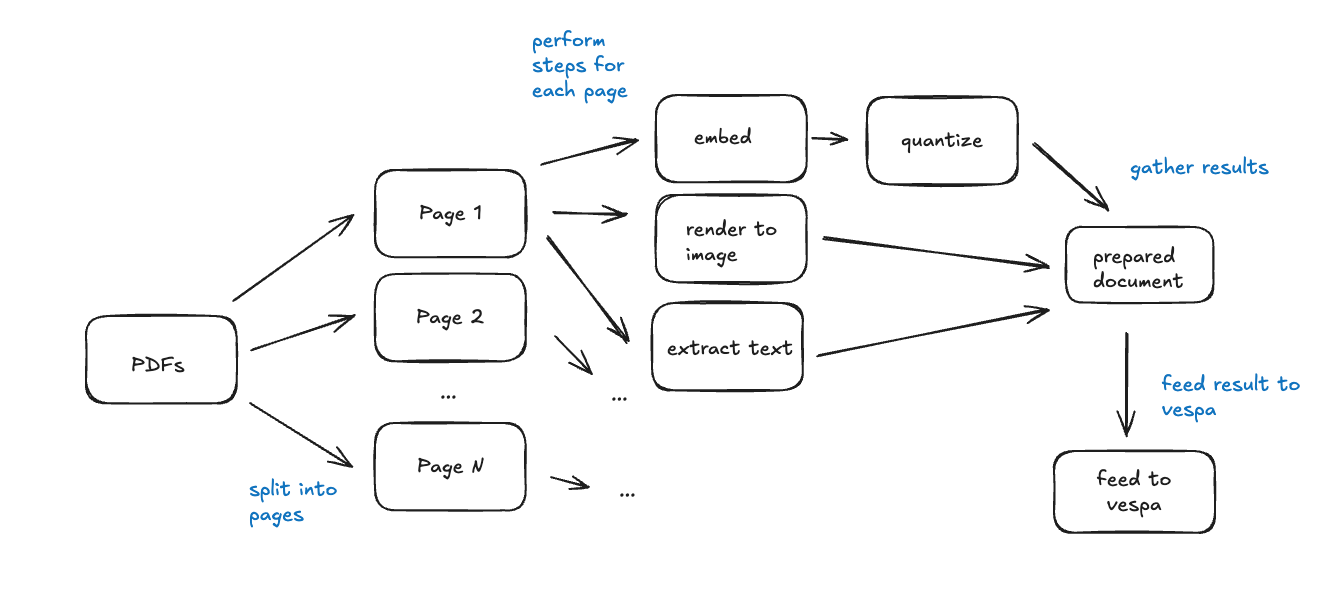
The process of preparing a set of PDF documents for ingestion and later querying through Vespa is done in the following 5 steps:
- Extract each page of each PDF document, and read the text from it. This text, along with the document title is used for BM25 ranking.
- Render each page of the document as an image (Pillow Image in Python), and feed this image through the ColPali embedding model. This produces 1024 patches (32x32 patches) of the image, and consequently a 1024 length tensor. There are 128 dimensions, resulting in a tensor shape of (1024, 128).
- Quantize the tensor into a 128-bit long vector, which is stored directly in Vespa. This vector embedding is used for the HNSW search.
- Collect other metadata such as the PDF name, release year, and generate some example questions using Gemini. We also collect screenshots and raw page PDFs of the document pages for preview in the web application.
- Once all the metadata and embeddings for each document has been collected, we feed it into our Vespa Cloud instance. The application is now ready to receive queries.
We also wrote a blog post about this process.
This demo uses open data from the United Nations. The materials are available under the Creative Commons Attribution 3.0 IGO license. Full license terms are available at the United Nations HDR website.
Querying the dataset
Any given user query has its text cleansed of stopwords and is embedded using ColPali. As we did during dataset preprocessing, we quantize this tensor such that its shape is a 128-bit vector. This vector is sent to Vespa for the HNSW search.
We query the top 4 results, and fetch the metadata for the page which is then sent to the user's web browser. From here, the user can interact with the demo and finally invoke a RAG pipeline where the returned document metadata is passed along with a system prompt to Google Gemini. The output from Gemini is visible to the user.
Token relevancy
Because a photo of each page in the PDF document is embedded using a vector, it is possible to create a heatmap overlay that estimates the relevancy for another given embedding. Using the text embedding of the user's search query, we were able to generate a heatmap overlay for each token and how "relevant" it was deemed by the ColPali vision model.
This is seen live using either an example query like "woman wearing headphones", or a query of your own.
Application architecture
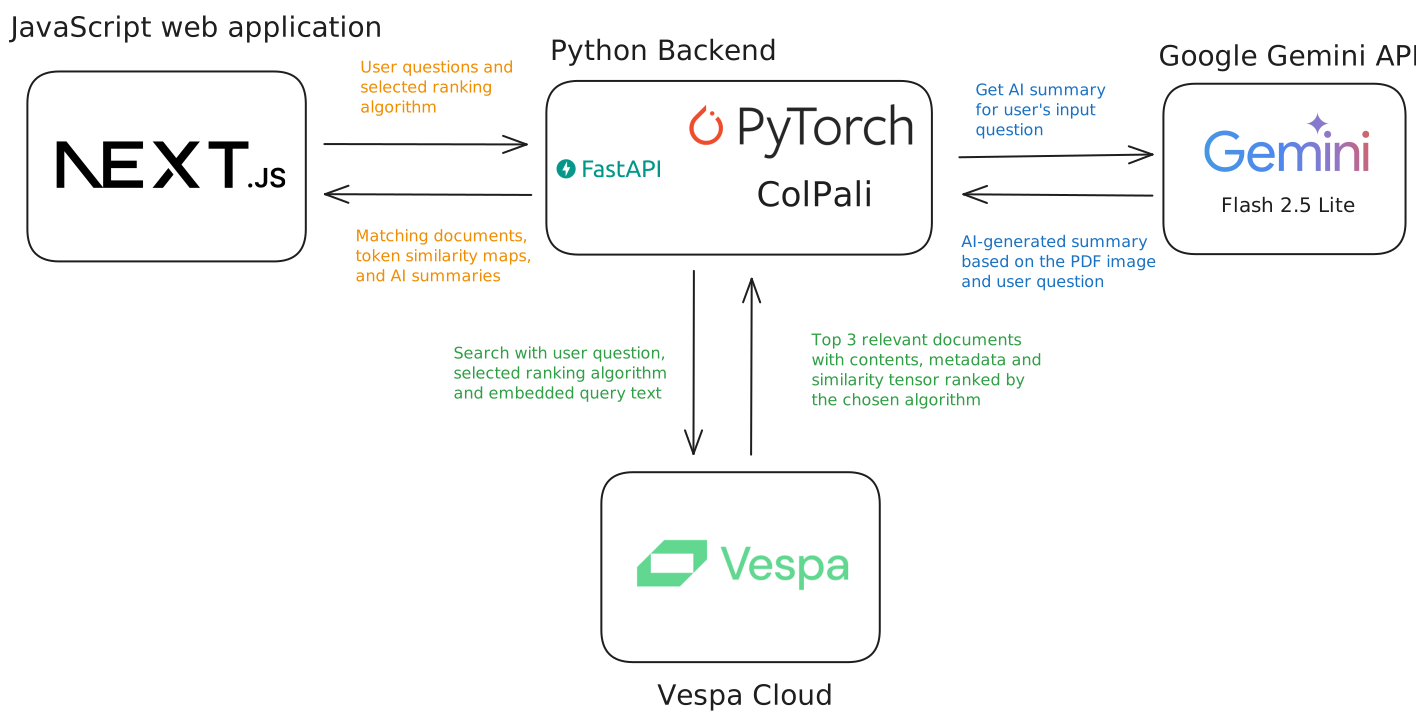
- JavaScript web application: This is the website you are currently visiting. It is responsible for providing a user interface, and visualization of the matching documents.
- Python Backend: Provides a HTTP API the web application can speak to. Responsible for querying Vespa and generating the similarity maps.
- Vespa Cloud: Hosts our Vespa document store which has been fed the 4770 documents that you can search through. Vespa Cloud is the easiest way to get started with Vespa, and we provide a free $300 in credits to new customers.
- Google Gemini: Is used to demonstrate a real-world retrieval augmented generation (RAG) workflow. Based on the documents ranked by Vespa, the generative AI model is capable of providing more precise answers.